Goals
- Simple and ergonomic formatting of strings, especially where multiple styles are applied to same line.
- Focus on colours and text styling
- Support full colour range on modern terminals
Non-goals
- Any extended "Terminal UI" kind of features, we're just doing text styling (but hopefully it should fit in fine with
FormatorFmt's existing box and table features etc) - Maximum performance: if you are formatting high volumes of logs you may like to look at the alternatoive below. (Performance should be ok but it's not benchmarked and at the end of the day we have to parse the string tags)
See also
These two OCaml libs both provide support for styling console text with the basic 16 ANSI colours, and both also offer other features useful for formatting and interactivity in the terminal.
In contrast, Spectrum focuses only on coloured text styling but offers deeper colour support. Hopefully it's complementary to the stdlib and other libs you may be using.
Installation
It's released on opam, so:
opam install spectrumUsage
To use Spectrum we have to configure a pretty-print formatter (type: Format.formatter, often just called a ppf) in order to enable our custom tag handling.
This looks something like:
let reset_ppf = Spectrum.prepare_ppf Format.std_formatter;;
Format.printf "@{<green>%s@}\n" "Hello world 👋";;
(* when you're done with Spectrum printing you can use the returned function
   to restore the original ppf state (Spectrum disabled)... *)
reset_ppf ();;
The pattern is @{<TAG-NAME>CONTENT@}.
So in the example above <green> is matching one of the 256 xterm color names. Tag names are case-insensitive.
Spectrum also provides an "instant gratification" interface, where the prepare/reset of the ppf happens automatically. This looks like:
Spectrum.Simple.printf "@{<green>%s@}\n" "Hello world 👋";;This is handy when doing ad hoc printing, but bear in mind that it is doing the prepare/reset, as well as flushing the output buffer, every time you call one the methods. For most efficient use in your application it's better to use the explicit prepare_ppf form.
NOTE: Format.sprintf uses its own buffer (not the Format.str_formatter singleton) so AFAICT there is no way for prepare_pff to enable Spectrum with it. This means if you need a styled sprintf you have to use Spectrum.Simple.sprintf, or use the longer way with Format.fprintf and your own buffer described in the Format docs.
Tags
You can have arbitrarily nested tags, e.g.:
Spectrum.Simple.printf "@{<green>%s @{<bold>%s@} %s@}\n" "Hello" "world" "I'm here";;Which should look like:

Above, the tag bold is used to output one the ANSI style codes.
Spectrum defines tags for these styles:
bolddimitalicunderlineblinkrapid-blinkinversehiddenstrikethru
As well as the named palette colours you can directly specify an arbitrary colour using short or long CSS-style hex codes:
Spectrum.Simple.printf "@{<#f0c090>%s@}\n" "Hello world 👋";;
Spectrum.Simple.printf "@{<#f00>%s@}\n" "RED ALERT";;
...or CSS-style rgb(...) or hsl(...) formats:
Spectrum.Simple.printf "@{<rgb(240 192 144)>%s@}\n" "Hello world 👋";;
Spectrum.Simple.printf "@{<hsl(60 100 50)>%s@}\n" "YELLOW ALERT";;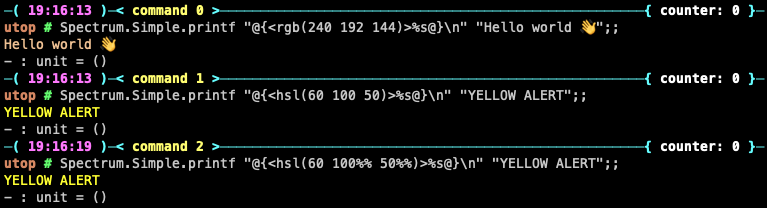
As in CSS, comma separators between the RGB or HSL components are optional.
NOTE: in CSS you would specify HSL colour as (<hue degrees> <saturation>% <lightness>%) but in a format string the % has to be escaped as %%. Since that is ugly Spectrum will also accept HSL colors without % sign (see above). As in CSS, negative Hue angles are supported and angles > 360 will wrap around.
Foreground/background
By default you are setting the "foreground" colour, i.e. the text colour.
Any colour tag can be prefixed with a foreground fg: or background bg: qualifier, e.g.:
Spectrum.Simple.printf "@{<bg:#f00>%s@}\n" "RED ALERT";;
Finally, Spectrum also supports compound tags in comma-separated format, e.g.:
Spectrum.Simple.printf "@{<bg:#f00,bold,yellow>%s@}\n" "RED ALERT";;
Interface
Spectrum provides two versions of the main module:
- The default is
Spectrumand, like stdlibFormat, it will swallow any errors so that invalid tags will simply have no effect on the output string. - Alternatively
Spectrum.Exnwill raise an exception if your tags are invalid (i.e. malformed or unrecognised colour name, style name).
Both modules expose the same interface:
val prepare_ppf : Format.formatter -> unit -> unit

module Simple : sig
  (** equivalent to [Format.printf] *)
  val printf : ('a, Format.formatter, unit, unit) format4 -> 'a

  (** equivalent to [Format.eprintf] *)
  val eprintf : ('a, Format.formatter, unit, unit) format4 -> 'a

  (** equivalent to [Format.sprintf] *)
  val sprintf : ('a, Format.formatter, unit, string) format4 -> 'a
end
As you can see in the examples in the previous section, Spectrum.Simple.printf works just like Format.printf from the OCaml stdlib, and eprintf and sprintf also work just like their Format counterparts.
Capabilities detection
I've ported the logic from the https://github.com/chalk/supports-color/ nodejs lib, which performs some heuristics based on env vars to determine what level of color support is available in the current terminal.
In most cases you can also override the detected level by setting the FORCE_COLOR env var.
The following method is provided:
Spectrum.Capabilities.supported_color_levels () -> color_level_info

type color_level_info = {
  stdout : color_level;
  stderr : color_level;
}
The following levels are recognised:
type color_level =
  | Unsupported (* FORCE_COLOR=0 or FORCE_COLOR=false *)
  | Basic       (* FORCE_COLOR=1 or FORCE_COLOR=true *)
  | Eight_bit   (* FORCE_COLOR=2 *)
| True_color (* FORCE_COLOR=3 *)Unsupported: probably best not to use colors or stylingBasic: supports 16 colors, i.e. the 8 basic colors plus "bright" version of each. They are equivalent to the first eight colours of the xterm 256-color set, with bright version accessed by setting the style to bold. So the available colour name tags are:black(withboldwill display as:grey)maroon(withboldwill display as:red)green(withboldwill display as:lime)olive(withboldwill display as:yellow)navy(withboldwill display as:blue)purple(withboldwill display as:fuchsia)teal(withboldwill display as:aqua)silver(withboldwill display as:white)greyredlimeyellowbluefuchsiaaquawhite
Eight_bit: supports the xterm 256-color palette. Named colours beyond the first 16 above should keep their hue when bolded. CSS 24-bit colours likely won't work.NOTE: colour names from that list have been normalised by hyphenating, and where names are repated they are made unique with an alphabetical suffix, e.g.
SpringGreen3is present in Spectrum as:spring-green-3aspring-green-3b
- See the defs at https://github.com/anentropic/ocaml-spectrum/blob/main/lib/lexer.mll#L24
True_color: should support everything
Changelog
0.6.0
- finally understood what the interface should be 😅
- expose main interface via the parent
Spectrummodule (instead ofSpectrum.Printeras it used to be) - main interface is now
Spectrum.prepare_ppf, allowing Spectrum tag handling with the usualFormat.printfmethods, with the usual buffering behaviour in user's control - "instant gratification" interface (previously our main interface) is now
Spectrum.Simple.printfand friends, having the always-flush buffer behaviour - changed the colour names in
Basicrange to match the list at https://www.ditig.com/256-colors-cheat-sheet - make
%char optional in HSL colours, to avoid ugly escaping
0.5.0
- support CSS-style
rgb(...)andhsl(...)color tags
0.4.0
- port the terminal colour capabilities detection from chalk.js
0.3.0
- expose separate
ExnandNoexninterfaces - fix for buffer interaction issue (tests broke when updating dep
Fmt.0.9.0) ...probably affected most uses ofsprintf_into - replace
sprintf_intokludge with a workingsprintfimplementation
0.2.0
- first viable version
TODOs
- tests for all methods (
sprintfand the lexer are tested currently), property-based tests - publish the printer and capabilities-detection as separate opam modules?
- expose variant types for use with explicit
mark_open_stagand close calls? auto coercion to nearest supported colour, for high res colours on unsupported terminals, as per
chalk- don't output any codes if level is
Unsupported
- don't output any codes if level is